


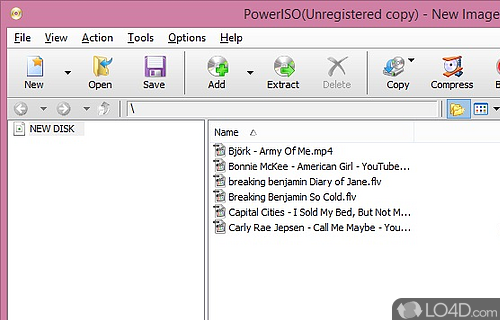
Multipurpose DVD, Blue-ray and CD Image Tool.
PowerISO is an extremely useful and versatile Bluray, DVD and CD image program. PowerISO can manage disc images with ease, allowing you to mount blu-ray ISO images to your computer as a virtual drive. It can extract data from almost all BR/DVD/CD images such as BIN and ISO files.
When you've installed PowerISO, it also becomes integrated into your Windows shell, giving you 1-click access to several tools built in to the program.. great for access data from an image or burning it to a disc as a backup.
PowerISO also comes with full burning support, allowing you to create audio CDs from mp3s, Video and Data DVDs with full support for newer Blu-ray technology.
PowerISO is fully supported on Windows 64-bit and runs completely stable on either 32- or 64-bit operating systems. It very rarely crashes and burning almost never results in shiny coasters, something some other similar applications are known for.
Features of PowerISO
- AES Encryption: Encrypt ISO file and other CD/DVD image files with password protection.
- Burn Disc: Burn ISO file and other CD/DVD/Blu-ray Disc image files to CD-R, CD-RW, DVD-R, DVD+R, DVD-RW and DVD+RW.
- Compress ISO: Compress ISO file and other CD/DVD image files, save your disc space.
- Convert Image: Convert image files between ISO/BIN and other formats.
- Copy Disc: Copy CD/DVD to ISO file or CD/DVD Disc.
- Create Bootable USB: Create bootable USB drive.
- Create ISO: Create ISO file or BIN CUE file from hard disk files.
- DAA File: Convert DAA file to ISO file.
- Edit ISO: Edit an existing ISO file directly.
- Extract Disc: Extract files and folders from ISO file.
- Make Audio CD: Make standard audio CD from MP3, WMA, APE, FLAC, WAV files.
- Merge ISO: Merge multiple ISO files into one.
- Mount ISO: Mount ISO file with internal virtual drive.
- Split ISO: Split large image file over multiple CD/DVD.
Compatibility and License
This download is licensed as shareware for the Windows operating system from CD burner software and can be used as a free trial until the trial period ends (after an unspecified number of days). The PowerISO 9.5 demo is available to all software users as a free download with potential restrictions and is not necessarily the full version of this software.
What version of Windows can PowerISO run on?
PowerISO can be used on a computer running Windows 11 or Windows 10. Previous versions of the OS shouldn't be a problem with Windows 8 and Windows 7 having been tested. It runs on both 32-bit and 64-bit systems with no dedicated 64-bit download provided.
Filed under:
- PowerISO Download
- ISO Creation Software